
Home Link user guide
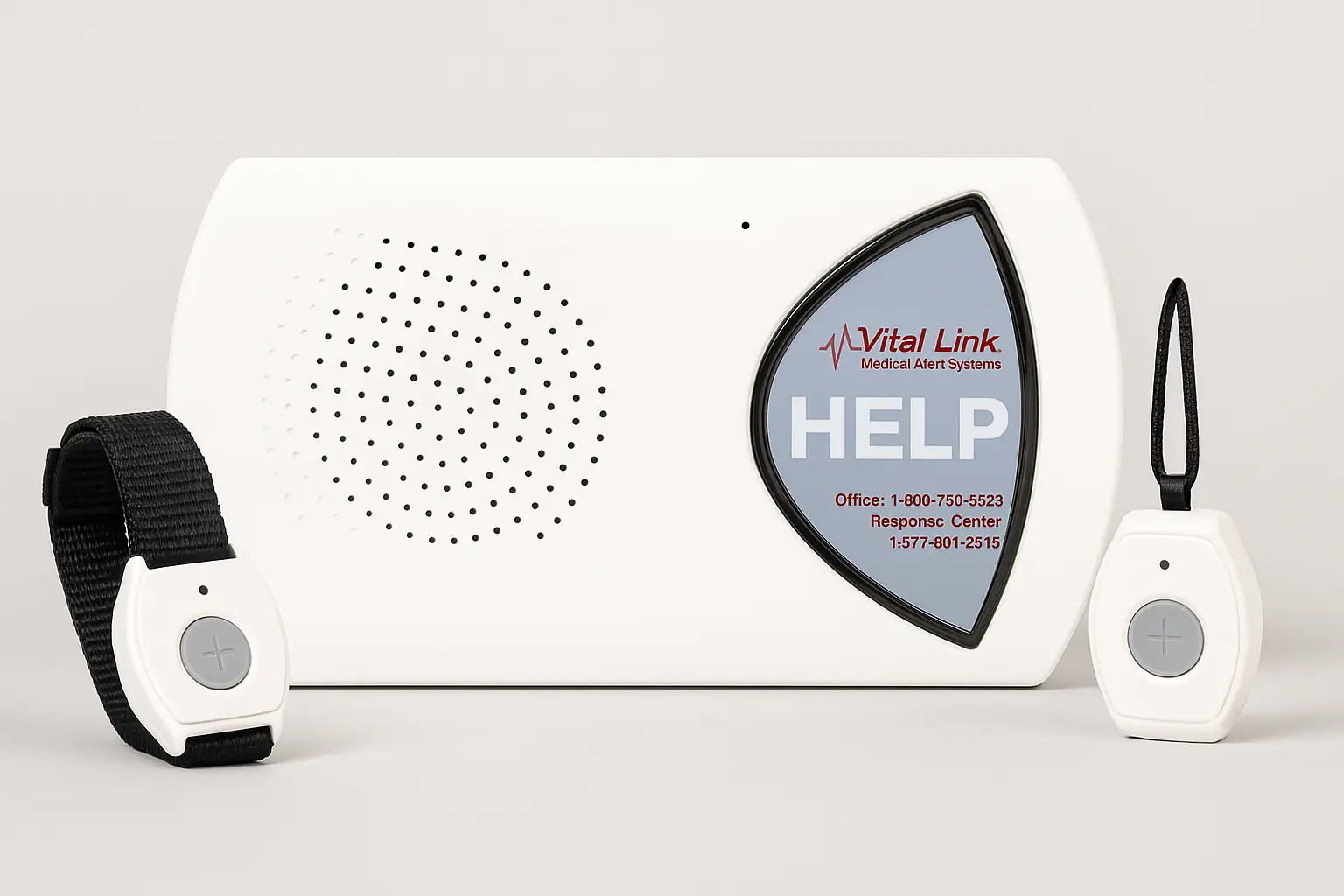
Your at-home medical alert. It calls for help through your home phone line, and your help button works anywhere within about 600 feet of the base.
Your system
- The base sits in your home, plugged into the wall and into your phone line. The large blue HELP button is on the front, and a small STATUS light sits at its lower left edge.
- On the back are a black RESET button and a white T/L button. You only need them for a few steps in this guide.
- Your help button is worn around your neck or on your wrist. It is waterproof.
How to call for help
- Press your help button. You can also press the large HELP button on the base.
- The base says "Calling for help", then "Call connected, please wait".
- A trained attendant speaks to you through the base. Its microphone hears around corners, so you do not need to be right next to it.
- Tell them what you need. The next section says what happens after that.
Pressed it by mistake? Stay near the base and tell the attendant. That is fine.
What to expect in an emergency
- The attendant asks if you need help. Tell them what is happening, as much as you can.
- If you need an ambulance, the fire department or the police, they send them to the address we have on file for you.
- They can also call the people on your contact list, in the order you gave us, to let them know or to ask them to come.
- If you cannot answer, they treat the call as an emergency until they know you are safe. They try to reach you through the base, then follow your plan: calling your home phone, the people on your list, or emergency services.
Be ready before you need it
- Keep your contact list up to date. Call us when someone on it gets a new phone number or can no longer help.
- Tell us about any change to your address, phone number or health, so the attendant always has the right information.
- If we left you a Vial of Life, keep it in your refrigerator with your current medications written in it, so paramedics can find them.
Wear your help button
- Wear it all the time, day and night. It can only help you while it is on you.
- It is waterproof. Wear it in the bath and the shower, where many falls happen.
- It works anywhere in and around your home, up to about 600 feet from the base, including the yard. It does not work away from home.
Test it once a month
Testing shows that everything works, from your button to the monitoring center. Test at least once a month, or as often as you like.
- Press your help button.
- When the attendant answers, say "This is a test."
- They may check your name, address and phone number, so we always have them right.
A test takes less than 3 minutes and normally does not call your family.
Your system checks itself
- The base watches its own power and its phone line all the time. If either has a problem, the STATUS light changes. The table below says what each light means.
- If the power goes out, a backup battery keeps the base working for up to 80 hours.
- Your help button checks its own battery each time you press it. A green light on the button means the battery is good. A red light means it is getting weak: call us and we will replace it.
What the light on the base means
| The light | What it means |
|---|---|
| Steady green | Ready. Everything is working. |
| Steady red | It is calling the monitoring center. |
| A short green flash every few seconds | No power from the wall, so it is running on its backup battery. Check the plug, and use an outlet that is not controlled by a light switch. |
| A short red flash every few seconds | It is not connected to a working phone line. Check the phone cord at the base and at the wall. |
| A short orange flash every few seconds | No power from the wall and no phone line. Check both. |
| Off | It has no power and no phone line, or it has been turned off. Call us. |
What you may hear it say
| It says | What it means |
|---|---|
| "System ready" | Everything is normal and ready. |
| "Calling for help" | It is calling the monitoring center. |
| "Call connected, please wait" | An attendant is about to speak to you. |
| "Please check telephone connections" | Check the phone cord at the base and at the wall. If it keeps saying this, call us. |
Adding a new help button
Call us before you add a button, so we can update your record. Then:
- With the base plugged in and working, press the white T/L button on the back once. It says "Range test mode".
- Press the large HELP button once. It says "Program personal help buttons".
- Press and hold your new help button. After 2 or 3 seconds the base starts a pattern of one second of tone, then two seconds of quiet. That means it has learned the button, so let go.
- Press the black RESET button on the back. It says "System ready".
- Test the new button: press it and tell the attendant you are testing a new button.
The base remembers up to four help buttons for you. If a fifth is added, it forgets the one it has heard from least recently.
Check your button reaches every room
Do this once after your system is set up, and again if you move the base.
- Press the white T/L button on the back once. It says "Range test mode".
- Press and hold your help button. The base makes a steady tone while it can hear the button.
- Keep holding it and walk through your home and yard. If the tone stops somewhere, the button cannot reach the base from there. Tell us and we will help you move the base.
- Let go of the button, then press the black RESET button. It says "System ready".
Turning it off
Once it is off, it cannot call for help. Please call us before you turn it off, for example before a move or before sending it back.
- Unplug the power cord from the wall.
- Press the white T/L button on the back 3 times. It says "Press HELP to turn off".
- Hold the large HELP button until the light goes out.
To turn it back on, plug it back in. It turns itself on and says "System ready".
Moving or going away
- Call us before you move the base or take it anywhere. The monitoring center sends help to the address we have on file, so we update it first.
Questions clients ask
Is my help button waterproof?
Yes. Wear it in the bath and the shower.
Does it work when I leave the house?
No. It works in and around your home, up to about 600 feet from the base.
Will it affect my telephone?
Only during a call for help. The base takes over the phone line and ends any call you are on, then gives the line back when the call is over.
Do I need to charge anything?
No. The base runs on wall power and has a backup battery.
What if the power goes out?
The backup battery keeps the base working for up to 80 hours.
What if I cannot talk, or the attendant cannot hear me?
The attendant tries to reach you through the base. If you do not answer, they follow your plan: they call your home phone, the people on your list in order, or emergency services.
Who answers when I press the button?
A trained attendant at our monitoring center, 24 hours a day, every day of the year.
Add more protection
You can add to your system at any time. Call us and we will tell you the price and set it up for you.
Fall detection button
A help button that also calls for help by itself if it senses a fall, for the times you cannot press it.
Wall button
A help button fixed to the wall, in a spot like the bathroom or beside the bed, for the times you are not wearing yours.
Extra help button
A second button to keep as a spare, or for a spouse or partner who lives with you.
Lockbox
A locked box for a house key, fixed by your door, so the people coming to help can get in if you cannot reach the door.
Questions? Call Vital Link: (510) 338-3466
Any day, about anything: a light you do not recognize, a test that did not go through, a new button, or a move.
More from Vital Link
On our website
This guide in other languages: Español · 繁體中文 · 简体中文 · Tiếng Việt · Русский · فارسی · 한국어 · Tagalog · 日本語 · हिन्दी · ਪੰਜਾਬੀ · Português · Français · Deutsch · Italiano · Polski · Українська · العربية · دری · አማርኛ · Հայերեն · తెలుగు · ລາວ

