

Mobile Link user guide
Your mobile medical alert system.
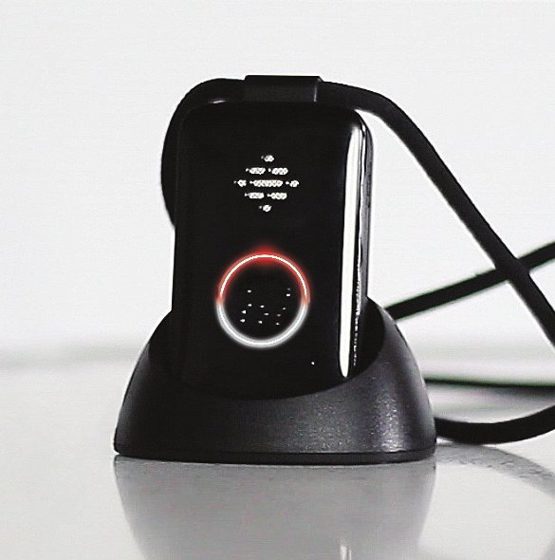
How to charge Mobile Link
IMPORTANT: Fully charge the device before first use.
- Plug in the charging cradle and place the device into the cradle as shown.
Typical charging time is 2-3 hours. The red battery light flashes every 5 seconds while charging and is solid when the device is fully charged.
It is normal for the light around the call button on the device to be off when the device is not in the charging cradle.
You can check the battery level at any time by pressing the battery level indicator button on the side of the device. The device will either say "Battery OK" or "Battery low, please charge."
NOTE: The device’s rechargeable battery lasts up to 30 days per charge. Only charge as needed. Wear your device as often as possible to be protected.
Meet your Mobile Link
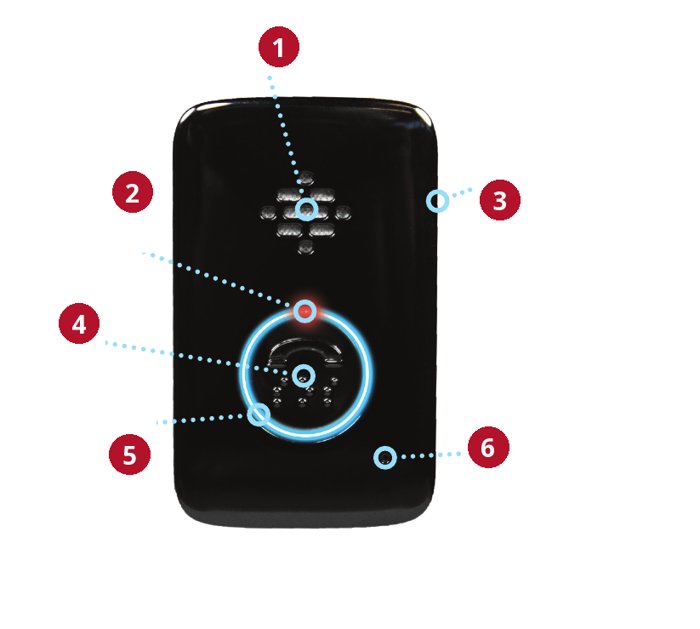
- Speaker
- Red light at top of call button
- Battery level indicator button, on the side
- Call button
- Blue light around call button
- Microphone
Red battery light at top of call button
- While charging, the red battery light will flash every 5 seconds until the device is fully charged.
- Once fully charged, the red battery light will be solid.
Blue call light around call button
- During an SOS call, the blue call light will be solid.
- The blue call light will flash every 5 seconds while charging and for a short time after a call ends.
How to call for help
- Press and hold the call button until the light around the call button on the device turns blue.
- After a short delay, you will hear a voice message and then tones or ringing.
- The specialist will answer the call.
- The specialist can send emergency personnel or loved ones to help you.
If your Mobile Link does not connect properly, please call us immediately.
Testing Mobile Link weekly
We recommend that you test Mobile Link weekly.
- To test, press and hold the call button until the light around the call button on the device turns blue.
- After a short delay, you will hear a voice message and then tones or ringing.
- The specialist will answer the call.
- Tell the specialist you are testing.
If your Mobile Link does not test properly, please call us immediately.
Replace lanyard with belt clip
- Remove the lanyard by pressing the small tab upward to release the clip.
- Pull the lanyard and clip away from the device.
- Press the clip on the back of the belt clip into the slot on the back of the device until it clicks.
Note: You can charge the device in its cradle with the belt clip attached.


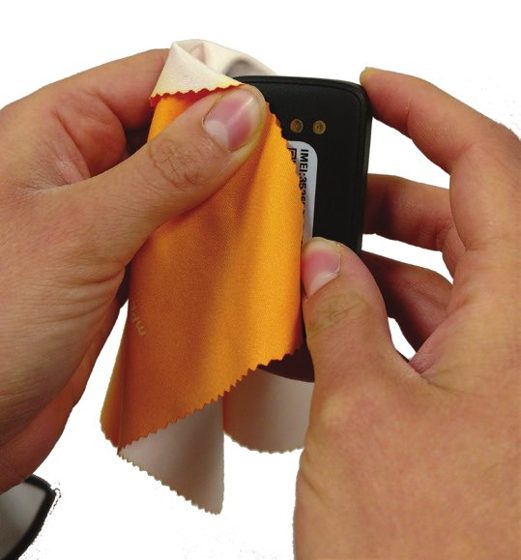
Cleaning Mobile Link weekly
We recommend that you clean Mobile Link weekly to ensure proper charging.
Take a soft cloth, such as an eyeglass cleaning cloth, and gently rub the gold contacts on the device and charging cradle to remove dirt, oil and debris.
You can also spray household cleaner onto the cleaning cloth (though do not spray directly onto the device or cradle) to remove debris.
By using this device, you acknowledge and accept the following information
Coverage
This product requires adequate cellular coverage to work properly. It is important to test the device to know if it works in your area. Remember that your environmental and topographical conditions may also affect your coverage. If you experience coverage issues, please call us immediately.
Charging
Your device’s rechargeable battery may last up to 30 days per charge. Wear your device at all times and only charge when necessary. Failure to follow charging procedures will result in the device not being able to function properly.
Water-resistant
The device is IP67 water-resistant. The device should not be submerged. The device should be towel-dried after exposure to water.
Pacemakers
Individuals with pacemakers should consult their physician and review their pacemaker materials regarding interaction with cell phones, and take the same precautions the materials recommend for this device.
Questions? Call Vital Link: (510) 338-3462
Any day, about anything: charging, a test that did not go through, a strap or clip, or a light you do not recognize.
More from Vital Link
This guide in other languages: Español · 繁體中文 · 简体中文 · Tiếng Việt · Русский · فارسی · 한국어 · Tagalog · 日本語 · हिन्दी · ਪੰਜਾਬੀ · Português · Français · Deutsch · Italiano · Polski · Українська · العربية · دری · አማርኛ · Հայերեն · తెలుగు · ລາວ
Location-based services and regulatory information
Location-Based Services: Some of the Equipment uses technology to permit third-parties, including the Monitoring Center, to determine where you are physically located at any given time (the "Location Based Services"). Location Based Services may work even if you are not in communication with the Monitoring Center. The accuracy of the Location Based Services is limited, and the Company, the Operators, the Monitoring Center, the Responders, or others may not be able to identify your location or the location of the Equipment precisely or at all. You authorize the Company to collect location-based information. We will only share your location-based information with the Operators, the Monitoring Center, the Responders, any person or entity that acquires the Company and/or the Company’s interest in and to the Monitoring Services, or any other person or entity you specifically designate and only for the purpose of providing and improving the Monitoring Services.
ANY AND ALL LOCATION-BASED INFORMATION IS MADE AVAILABLE FOR INFORMATIONAL AND PLANNING PURPOSES ONLY AND IS NOT INTENDED TO BE RELIED UPON IN SITUATIONS WHERE PRECISE LOCATION INFORMATION IS NEEDED OR WHERE ERRONEOUS, INACCURATE, TIME-DELAYED OR INCOMPLETE LOCATION OR MAP DATA MAY LEAD TO DEATH, PERSONAL INJURY, OR PROPERTY OR ENVIRONMENTAL DAMAGE. YOU AGREE THAT LOCATION-BASED INFORMATION MAY VARY FROM ACTUAL LOCATION(S), ROAD, OR TERRAIN CONDITIONS DUE TO FACTORS THAT CAN AFFECT THE ACCURACY OF THE MAP DATA, SUCH AS, BUT NOT LIMITED TO, WEATHER, ROAD, AND TRAFFIC CONDITIONS, GEOPOLITICAL EVENTS, AND CONDITION OR STATUS OF YOUR CELLULAR PHONE OR CELLULAR SERVICES. WE DO NOT GUARANTEE ACCURACY OR COMPLETENESS OF ANY LOCATION-BASED INFORMATION.

