
Guía del usuario: Mobile Link (S)
Su sistema móvil de alerta médica.
Usamos inteligencia artificial (IA) para traducir esta guía, no una persona. Le pedimos disculpas por cualquier error.
We used AI (artificial intelligence) to translate this guide, not a person. We apologize for anything that is wrong.
Cómo cargar Mobile Link
IMPORTANTE: Cargue Mobile Link por completo antes de usarlo por primera vez.
- Enchufe la base de carga y coloque Mobile Link en la base.
La carga suele tardar de 2 a 3 horas. La luz roja de batería parpadea cada 5 segundos mientras se carga y queda fija cuando Mobile Link está totalmente cargado.
Es normal que la luz alrededor del botón de llamada de Mobile Link esté apagada cuando el dispositivo no está en la base de carga.
Puede revisar el nivel de batería en cualquier momento oprimiendo el botón indicador de batería en el costado del dispositivo. El dispositivo dirá "Battery OK" (batería bien) o "Battery low, please charge" (batería baja, cárguelo).
NOTA: La batería recargable de Mobile Link dura hasta 45 días por carga. Cárguelo solo cuando sea necesario. Lleve puesto el dispositivo el mayor tiempo posible para estar protegido.
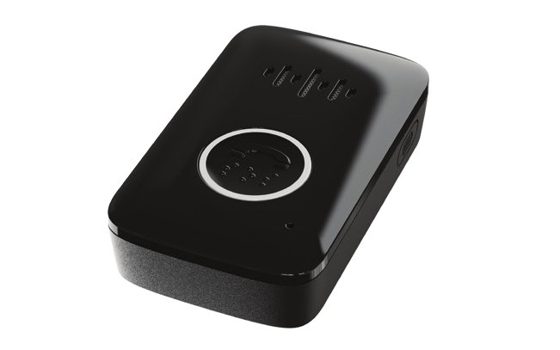
Conozca su Mobile Link
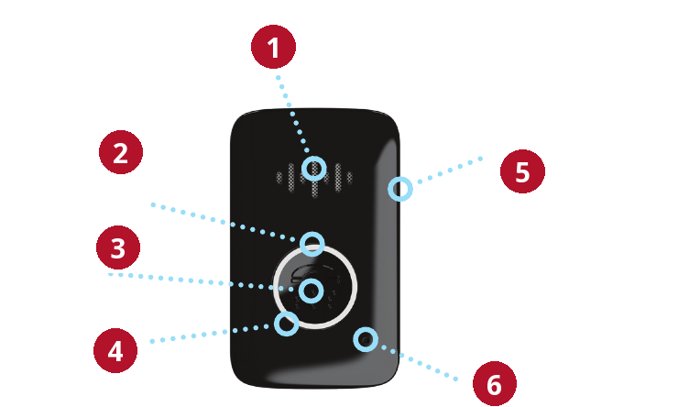
- Altavoz
- Luz roja arriba del botón de llamada
- Botón de llamada
- Luz azul alrededor del botón de llamada
- Botón indicador de batería, en el costado
- Micrófono
El dispositivo habla en inglés. Esta guía muestra lo que dice en inglés, con su significado al lado.
Luz roja de batería arriba del botón de llamada
- Mientras se carga, la luz roja de batería parpadea cada 5 segundos hasta que el dispositivo está totalmente cargado. Cuando está totalmente cargado, la luz roja de batería queda fija.
- Si la batería está baja, la luz roja de batería parpadea lentamente durante 3 minutos después del reporte diario, de una llamada SOS o de sacarlo de la base.
Luz azul de llamada alrededor del botón de llamada
- Durante una llamada SOS, la luz azul de llamada queda fija.
- La luz azul de llamada parpadea cada 5 segundos mientras se carga y por un rato después de terminar una llamada. También parpadea cada 5 segundos durante 3 minutos en el reporte diario a la red.
Cómo pedir ayuda
- Mantenga oprimido el botón de llamada y cuente 1, 2, 3, o hasta que la luz alrededor del botón de llamada de Mobile Link se ponga azul, y luego suelte el botón.
- Después de una breve pausa, oirá un mensaje de voz y luego tonos o timbre.
- El especialista contestará la llamada.
- El especialista puede enviar personal de emergencia o a sus seres queridos para ayudarle.
Si su Mobile Link no se conecta bien, llámenos de inmediato.
Pruebe Mobile Link cada semana
Le recomendamos probar Mobile Link cada semana.
- Mantenga oprimido el botón de llamada y cuente 1, 2, 3, o hasta que la luz alrededor del botón de llamada de Mobile Link se ponga azul, y luego suelte el botón.
- Después de una breve pausa, oirá un mensaje de voz y luego tonos o timbre.
- El especialista contestará la llamada.
- Dígale al especialista que está haciendo una prueba.
Si su Mobile Link no pasa la prueba, llámenos de inmediato.
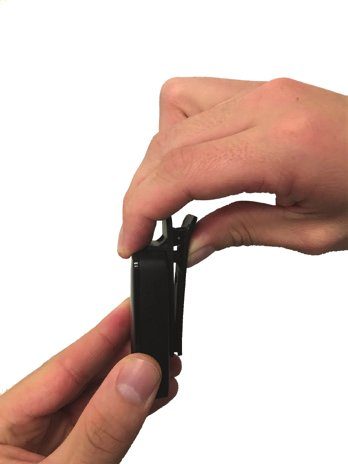
Cambiar el cordón por el clip para cinturón
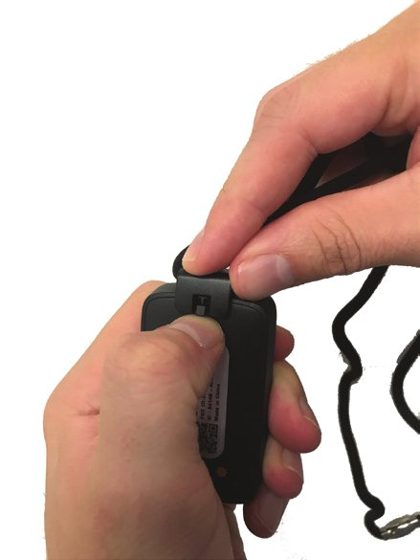
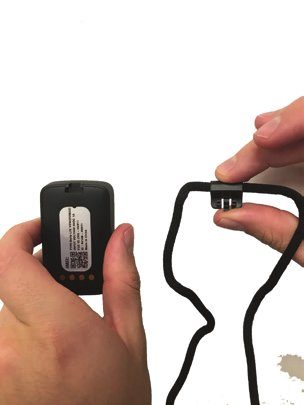
- Quite el cordón empujando la pequeña pestaña hacia arriba para soltar el broche.
- Separe el cordón y el broche de Mobile Link.
- Presione el gancho de la parte de atrás del clip para cinturón en la ranura de la parte de atrás de Mobile Link hasta que haga clic.
Nota: Puede cargar Mobile Link en su base con el clip para cinturón puesto.
Limpie Mobile Link cada semana
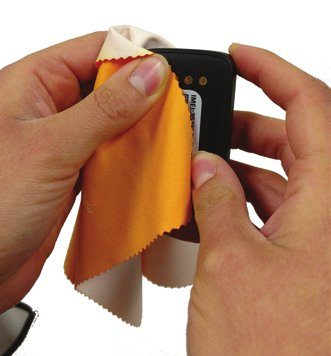
Le recomendamos limpiar Mobile Link cada semana para que cargue bien.
Use un paño suave, como el que se usa para limpiar anteojos, y frote con cuidado los contactos dorados del dispositivo y de la base de carga para quitar suciedad, grasa y residuos.
También puede rociar un limpiador de uso doméstico sobre el paño (pero no directamente sobre el dispositivo ni la base) para quitar residuos.
Al usar este dispositivo, usted reconoce y acepta la siguiente información
Cobertura
Este producto necesita una cobertura celular adecuada para funcionar bien. Es importante probar el dispositivo para saber si funciona en su zona. Recuerde que las condiciones de su entorno y del terreno también pueden afectar la cobertura. Si tiene problemas de cobertura, llámenos de inmediato.
Carga
La batería recargable de su dispositivo puede durar hasta 45 días por carga. Lleve puesto el dispositivo en todo momento y cárguelo solo cuando sea necesario. Si no sigue las instrucciones de carga, el dispositivo no podrá funcionar correctamente.
Resistente al agua
Mobile Link es resistente al agua con clasificación IP67. Mobile Link no debe sumergirse. Mobile Link debe secarse con una toalla después de mojarse.
Marcapasos
Las personas con marcapasos deben consultar a su médico y revisar la información de su marcapasos sobre la interacción con teléfonos celulares, y tomar con este dispositivo las mismas precauciones que esa información recomienda.
¿Preguntas? Llame a Vital Link: (510) 338-3462
Cualquier día, sobre cualquier cosa: la carga, una prueba que no funcionó, una correa o un clip, o una luz que no reconoce.
More from Vital Link
Servicios de ubicación e información reglamentaria
Este texto legal y reglamentario está en inglés, tal como lo publica el fabricante.
Location-Based Services: Some of the Equipment uses technology to permit third-parties, including the Monitoring Center, to determine where you are physically located at any given time (the "Location Based Services"). Location Based Services may work even if you are not in communication with the Monitoring Center. The accuracy of the Location Based Services is limited, and the Company, the Operators, the Monitoring Center, the Responders, or others may not be able to identify your location or the location of the Equipment precisely or at all. You authorize the Company to collect location-based information. We will only share your location-based information with the Operators, the Monitoring Center, the Responders, any person or entity that acquires the Company and/or the Company’s interest in and to the Monitoring Services, or any other person or entity you specifically designate and only for the purpose of providing and improving the Monitoring Services.
ANY AND ALL LOCATION-BASED INFORMATION IS MADE AVAILABLE FOR INFORMATIONAL AND PLANNING PURPOSES ONLY AND IS NOT INTENDED TO BE RELIED UPON IN SITUATIONS WHERE PRECISE LOCATION INFORMATION IS NEEDED OR WHERE ERRONEOUS, INACCURATE, TIME-DELAYED OR INCOMPLETE LOCATION OR MAP DATA MAY LEAD TO DEATH, PERSONAL INJURY, OR PROPERTY OR ENVIRONMENTAL DAMAGE. YOU AGREE THAT LOCATION-BASED INFORMATION MAY VARY FROM ACTUAL LOCATION(S), ROAD, OR TERRAIN CONDITIONS DUE TO FACTORS THAT CAN AFFECT THE ACCURACY OF THE MAP DATA, SUCH AS, BUT NOT LIMITED TO, WEATHER, ROAD, AND TRAFFIC CONDITIONS, GEOPOLITICAL EVENTS, AND CONDITION OR STATUS OF YOUR CELLULAR PHONE OR CELLULAR SERVICES. WE DO NOT GUARANTEE ACCURACY OR COMPLETENESS OF ANY LOCATION-BASED INFORMATION.
FCC: This device complies with part 15 of the FCC Rules. Operation is subject to the following two conditions: (1) This device may not cause harmful interference, and (2) this device must accept any interference received, including interference that may cause undesired operation. Changes or modifications not expressly approved by the party responsible for compliance could void the user’s authority to operate the equipment. This equipment has been tested and found to comply with the limits for a Class B digital device, pursuant to part 15 of the FCC Rules. These limits are designed to provide reasonable protection against harmful interference in a residential installation. This equipment generates, uses and can radiate radio frequency energy and, if not installed and used in accordance with the instructions, may cause harmful interference to radio communications. However, there is no guarantee that interference will not occur in a particular installation. If this equipment does cause harmful interference to radio or television reception, which can be determined by turning the equipment off and on, the user is encouraged to try to correct the interference by one or more of the following measures: Reorient or relocate the receiving antenna. Increase the separation between the equipment and receiver. Connect the equipment into an outlet on a circuit different from that to which the receiver is connected. Consult the dealer or an experienced radio/TV technician for help.
IC: This device contains licence-exempt transmitter(s)/receiver(s) that comply with Innovation, Science and Economic Development Canada’s licence-exempt RSS(s). Operation is subject to the following two conditions: 1. This device may not cause interference. 2. This device must accept any interference, including interference that may cause undesired operation of the device.
Cet appareil contient des émetteurs / récepteurs exemptés de licence conformes aux RSS (RSS) d’Innovation, Sciences et Développement économique Canada. Le fonctionnement est soumis aux deux conditions suivantes: 1. Cet appareil ne doit pas causer d’interférences. 2. Cet appareil doit accepter toutes les interférences, y compris celles susceptibles de provoquer un fonctionnement indésirable.
CAN ICES-3(B)/NMB-3(B)
Manufacturer: Freeus, LLC, www.freeus.com

